Quick answer: An LMS course catalog is a centralized, searchable directory of all the training your organization offers — online and in-person, internal and external — that lets learners browse, request, or self-enroll in courses in one place. In Smart Arena, the Catalog module groups related courses into categories, controls who can see what, and automates enrollment approvals and reminders, so admins manage less and learners find training faster.
If you already have a catalog feature switched on but your team isn’t using it, you’re not alone. The most common feedback our customer success team hears isn’t “the catalog is broken” — it’s “we didn’t realize it could do that.” A catalog looks like a simple list of courses. Used well, it’s the front door to your entire learning culture.
This guide explains what a course catalog is, how to build one in Smart Arena step by step, and — the part most articles skip — nine concrete, slightly-outside-the-box ways real L&D teams turn a static list into an engine for self-driven learning.
What a course catalog actually does (and why it matters)
A course catalog is the gateway to your learning programs. Instead of HR manually assigning every course to every person, the catalog flips the model: learners see what’s available to them and take the first step themselves.
Three things make this powerful:
It makes learning discoverable. Employees can’t request training they don’t know exists. A catalog surfaces the full knowledge base available to someone in their role, in one searchable place.
It reduces administrative load. When learners self-enroll or request access, admins stop being the bottleneck. Smart Arena layers approval workflows on top, so “self-service” never means “uncontrolled.”
It signals what the organization values. The courses you choose to feature — and how you group them — tell employees what skills matter here. A catalog is a culture document disguised as a menu.
The business case is measurable. When organizations add proper metadata and tagging to a large training catalog, learner self-enrollment can rise sharply — one documented case saw self-enrollment increase by over 40% on a 150-course catalog after structured tagging was introduced (LMS Portals). Discoverability isn’t a nice-to-have; it’s the difference between a catalog people use and one they forget.
What the Smart Arena Catalog module includes
Before the use cases, here’s what you’re actually working with. The Catalog module gives administrators an intuitive overview and control over every internal and external course offered over a defined period of time.
Key capabilities:
- Categories (catalogs): Group related courses into named catalogs so learners navigate by theme, department, or program rather than scrolling one giant list.
- Visibility control: Hide a catalog entirely or make it available to specific employees — useful for phased rollouts or audience-specific content.
- Self-enrollment and access requests: Learners can register directly or request access to a course.
- Multi-step approval: Enrollments can require confirmation by managers and/or HR before they’re finalized.
- Admin-driven enrollment: Alternatively, admins enroll users into the courses they need, straight from the catalog.
- Validity periods: Each catalog can run for a specified time window, so seasonal or campaign-based offerings expire automatically.
- Rich course information: Dates, content, and instructor details stay current and accessible to learners.
- Automated notifications: The system notifies people about available courses, changes to dates or locations, and reminders for upcoming course or testing deadlines.
- Any course type: Online or traditional, internal or external — and when paired with the Classic Courses module, in-person sessions live in the same place as e-courses.
The catalog list view itself shows each catalog’s name, description, validity period, publication status, and creator, with edit and delete controls on every row.
How to set up a course catalog in Smart Arena (step by step)
Setting up your first catalog takes minutes. Here’s the flow.
- Open Catalog Management. From the admin area, go to the Catalogu section. You’ll see the full list of existing catalogs with their status and validity dates.
- Click “Create new catalog.” This starts the guided setup.
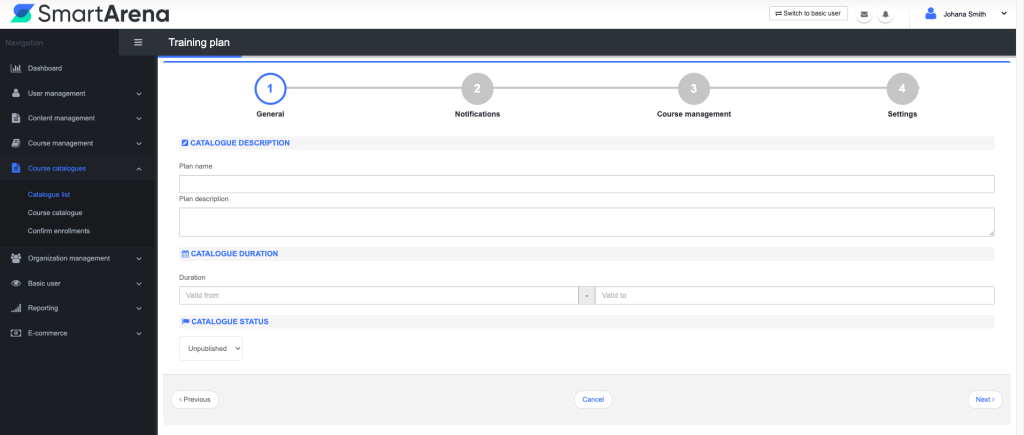
Step 1: General settings
Name the catalog, write a clear description (this is what learners read when deciding to enroll — make it count), and set the validity period.
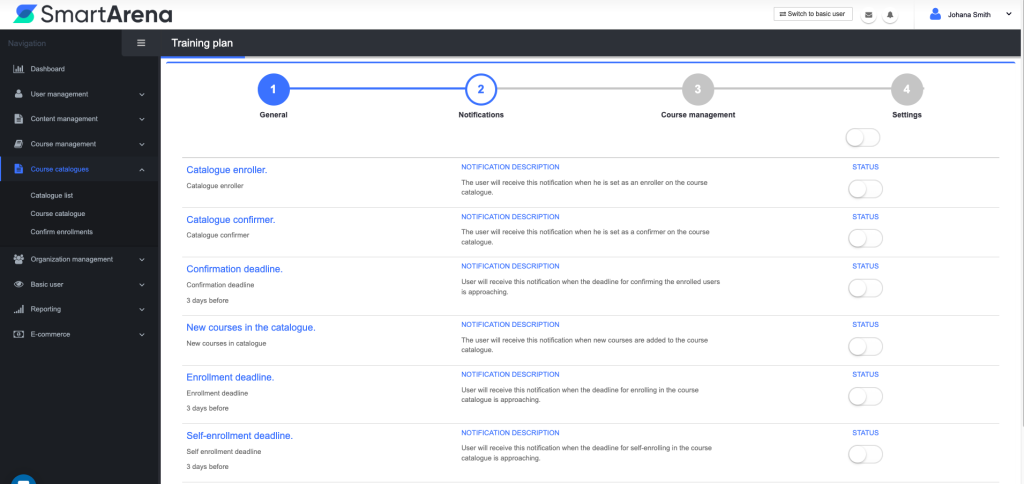
Step 2: Notifications
Choose which automated messages go out: new course availability, date or location changes, and deadline reminders.
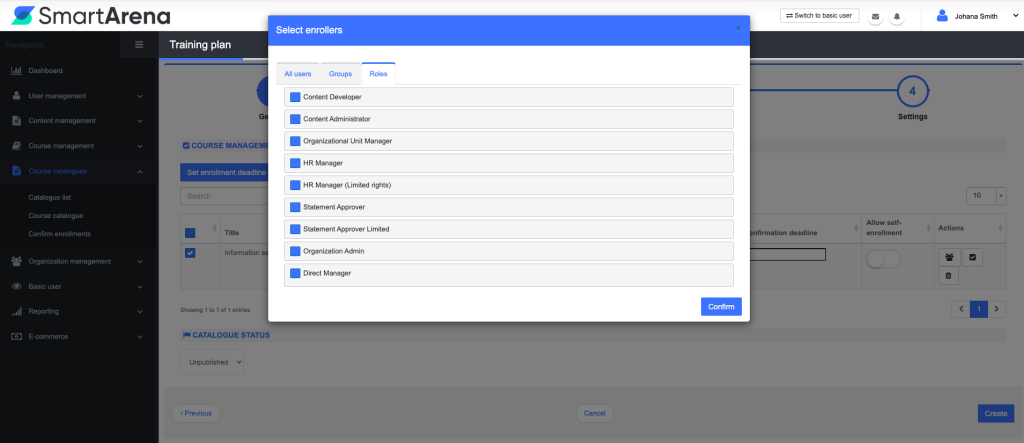
Step 3: Settings & enrollment rules
Decide whether learners self-enroll, request access with manager/HR approval, or are enrolled by admins. Set visibility — who can see this catalog.
Add courses to the catalog
When building or editing an e-course, use the Add to course catalogs step to place it in one or more catalogs.
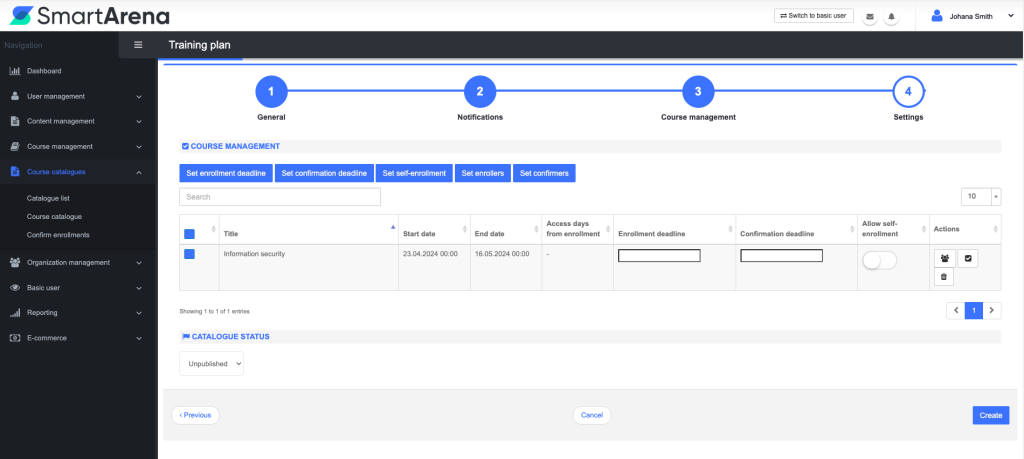
Publish
Set the catalog’s publication status so it appears for your chosen audience. Use the search bar and the Show enrolled users view to monitor uptake.
Editor’s tip: Write the catalog description for a skeptical learner, not for the admin. “12 short modules on giving feedback — finish in a lunch break” beats “Feedback Training Programme 2026.” Specific, time-bound descriptions are the single biggest lever on self-enrollment.
9 creative ways to use your course catalog
Most teams use the catalog for exactly one thing: a list of mandatory courses. Here are nine ways to get far more out of it.
1. Build a “New Here?” onboarding catalog
Create a single catalog that’s the entire first-week experience for new hires — company essentials, tools, compliance basics, and a “meet the teams” course. Set it to auto-display for new accounts. New hires get one obvious place to start instead of a scattered list of assignments. Pair it with multi-step approval so a manager confirms completion before week two.
2. Run a seasonal “skills sprint” with a validity period
Use the validity-period setting to launch a time-boxed catalog — say, a 30-day “Q3 AI Skills Sprint.” Scarcity drives action. Because the catalog expires automatically, you create urgency without manual cleanup, and you can measure exactly how a focused campaign performs.
3. Create a manager-approval catalog for premium or paid external training
Put expensive external courses, conferences, or certifications behind the multi-step approval workflow. Employees browse and request; managers and HR approve in sequence. You get a clean, auditable record of who asked for what — and budget stays controlled without killing curiosity.
4. Turn the catalog into an internal “knowledge marketplace”
Invite teams to publish their own playbooks, process guides, and best practices as short courses, then group them in a “How We Work” catalog. The catalog becomes a living knowledge hub where internal expertise scales instead of staying trapped in a few people’s heads.
5. Use hidden catalogs for confidential or role-specific tracks
Visibility control lets you build catalogs that only certain people see — leadership development, sensitive compliance topics, or pre-promotion tracks. The content exists and is managed centrally, but only the intended audience knows it’s there.
6. Blend live and online learning in one catalog
With the Classic Courses module connected, a single “Leadership 2026” catalog can hold a self-paced e-course, an instructor-led workshop with scheduled sessions, and a follow-up assessment. Learners see the whole journey — not disconnected pieces — and track progress across all of it in one platform.
7. Stage a phased rollout instead of a big-bang launch
Rolling out a new LMS to 2,000 people at once is risky. Instead, publish one polished catalog to a pilot group using visibility settings, gather feedback, then widen the audience. The catalog becomes your release-management tool, not just a content list.
8. Make compliance renewals self-service
For recurring certifications, create a compliance catalog with automated deadline reminders switched on. Employees get nudged before their certification lapses and re-enroll themselves. HR stops chasing; the system does it. (Assign review dates to every course at creation so the catalog never quietly goes stale — content decay is one of the fastest ways to lose learner trust.)
9. Use catalog structure to map career paths
Name catalogs after roles or levels — “Path to Team Lead,” “Sales: Level 1 → 2.” When the catalog is the career framework, employees see exactly which courses move them forward. Learning stops being a chore and becomes a visible ladder.
Course catalog vs. direct assignment: which when?
| Course catalog (self-service) | Direct assignment | |
|---|---|---|
| Best for | Optional, exploratory, role-relevant learning | Mandatory, deadline-driven training |
| Who acts first | The learner (browses, requests, enrolls) | The admin (pushes the course) |
| Admin effort | Low and ongoing | High per campaign |
| Drives | Autonomy, discovery, culture | Compliance, completion guarantees |
| Smart Arena setup | Catalog with self-enroll or approval | Automated/admin enrollment |
The best programs use both: assign what’s required, and let the catalog handle everything people could benefit from. Autonomy and structure aren’t opposites — the catalog is where they meet.
Common mistakes that make a catalog go unused
A few patterns reliably kill catalog adoption:
- One giant uncategorized list. Without catalogs, tags, or clear descriptions, learners bounce. Group early, even with just a handful of courses.
- Vague course descriptions. “Communication Skills” tells a learner nothing. Lead with the outcome and the time commitment.
- Set-and-forget content. A catalog that was great 18 months ago becomes a liability when learners hit outdated courses. Assign every course a review date at creation.
- No measurement. Build a simple completion-and-enrollment dashboard at launch — not after you have 300 courses and reporting chaos.
- All-or-nothing visibility. If everyone sees everything, nothing feels relevant. Use audience-specific catalogs so what people see actually applies to them.
How Smart Arena’s catalog compares to other LMS platforms
“Course catalog” is the standard term across the LMS market — Docebo, TalentLMS, and LearnUpon all use it for the same core idea: a place where learners browse and self-enroll in training. If you’re evaluating platforms or migrating from another tool, here’s how the feature lines up.
| Platform | What it’s called | Self-enrollment | Approval workflow | Notable strengths |
|---|---|---|---|---|
| Smart Arena | Catalog module | Yes | Multi-step (manager + HR) | Multi-step approvals, validity periods, blends e-courses with in-person via Classic Courses |
| Docebo | Course catalog (internal + public) | Yes (free or approval) | Admin approval | Public catalogs, learning plans inside catalogs |
| TalentLMS | Course Catalog | Yes | Enrollment requests (instructor approval) | Self-enroll into learning paths, course capacity limits |
| LearnUpon | Catalog (internal + public) | Yes (self or request) | Request-to-enroll | Course Recommender (Netflix-style suggestions), learning journeys |
A few takeaways for buyers:
The basics are table stakes. Every serious LMS lets learners browse a catalog and self-enroll, with an option to require approval. If a platform doesn’t, that’s a red flag.
The differentiators are in the workflow. Docebo and LearnUpon lean on discovery (public catalogs, recommendation engines). Smart Arena’s edge is governance: multi-step approval by both managers and HR plus catalog-level validity periods, which matters most for regulated industries, budget-controlled external training, and organizations that need a clean audit trail of who approved what.
Blended learning is the real test. Many catalogs only handle e-courses. Smart Arena’s catalog holds online and in-person training side by side — when paired with the Classic Courses module, instructor-led sessions with scheduling and attendance live in the same catalog as self-paced content, so learners see the whole journey in one place.
The right choice depends on whether your priority is discovery (surfacing optional content to motivated learners) or governance (controlling access, approvals, and compliance). Map the catalog’s approval and visibility options to how your organization actually makes training decisions — that’s where these platforms genuinely diverge.
Frequently asked questions
What is a course catalog in an LMS?
A course catalog is a centralized, searchable directory of all the training an organization offers. It lets learners browse available courses and self-enroll or request access, rather than waiting for an administrator to assign each course manually. In Smart Arena, the Catalog module also supports approval workflows, visibility controls, and automated notifications.
What’s the difference between a course catalog and a learning path?
A catalog is a browsable menu of available courses; a learning path is a structured sequence a learner follows in order. They work together — a catalog can contain a multi-course path, so learners discover the path in the catalog and then follow it step by step.
Can learners enroll themselves, or does an admin have to do it?
Both are possible. In Smart Arena you can allow direct self-enrollment, require multi-step approval from managers and HR, or have admins enroll users directly from the catalog. You choose per catalog.
Can a course catalog include in-person training, not just e-learning?
Yes. The Catalog module supports online and traditional courses, internal and external. Connected with the Classic Courses module, instructor-led sessions with scheduling and attendance live alongside e-courses in the same catalog.
How do I keep a course catalog from becoming outdated?
Assign a review date to every course when it’s created, use validity periods on time-limited catalogs so they expire automatically, and check enrollment and completion data regularly. Outdated content is the quickest way to lose learner trust.
How does a course catalog increase course enrollment?
By making training discoverable and letting people choose for themselves. Clear categories, specific descriptions, and good metadata help learners find relevant courses — documented cases show structured tagging lifting self-enrollment by over 40%.
Turn your catalog into your learning front door
A course catalog isn’t a list — it’s the first impression of your entire learning program. The teams that get the most from Smart Arena’s Catalog module treat it as a product: clear categories, sharp descriptions, the right approval flow, and a regular refresh. Do that, and the catalog stops being a feature nobody uses and becomes the place your people go to grow.
Ready to put your catalog to work? Explore the LMS features or book a demo to see catalog setup in action.
Sources: LMS Portals — Building an Effective LMS Course Catalog; LMSPedia — How to Build & Manage a Training Catalog; Smart Arena — Introducing the Catalog Module; Docebo — Self-enrolling from catalogs; TalentLMS — How to work with the Course Catalog; LearnUpon — Learner view: Catalog.