Most corporate training content starts life as a PowerPoint. Onboarding decks, compliance modules, product training, process documentation — it’s all there, slide by slide, in a format that no LMS can track and no completion report can measure. The knowledge exists. The structure is roughly there. What’s missing is the instructional layer that turns a presentation into a deployable, trackable learning experience.
Converting PPT to SCORM has always been the logical step. The challenge is that it has never been a fast one. AI is changing that — but only when it’s applied to the right parts of the workflow. This guide walks through a practical, repeatable process for going from uploaded PowerPoint to published SCORM course, with AI doing the heavy lifting at every stage where it genuinely helps.
Why A Slideshow Is Not A Course
Before diving into the workflow, it’s worth being precise about what you’re actually converting — because the gap between a presentation and a course is wider than it looks.
A PowerPoint was designed to support a live speaker. Bullet points make sense when someone is talking over them. Sequences assume a presenter controlling the pace. Images and diagrams work as visual anchors for verbal explanation. Remove the presenter and what remains is often incomplete — content that references context that isn’t there, and a structure optimized for a room, not a screen.
A SCORM course is self-directed. The learner is alone, and every element has to carry its own weight. That means stated learning objectives, explanations that stand alone without a facilitator, assessments that test application not just recall, and a sequence that builds toward a defined outcome.
AI accelerates the conversion. It doesn’t make this distinction disappear. The goal is not a clickable slideshow — it’s a learning experience that happened to start as one.
Step 1: Upload PPT And Let AI Analyze The Full Deck
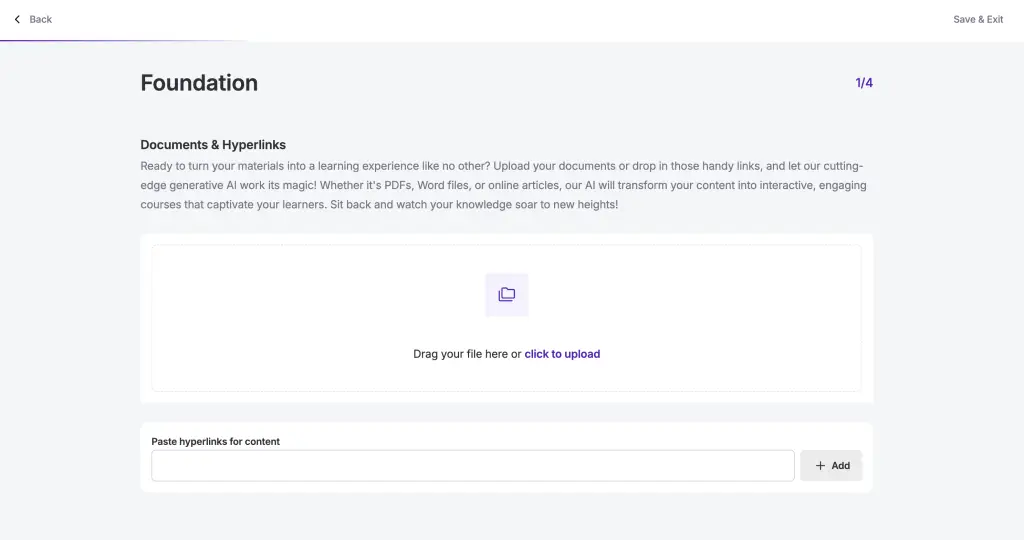
The first thing that separates a purpose-built AI authoring tool from a generic converter is what happens at upload. Use CourslyAI to analyze every component of your presentation — text, images, diagrams, and speaker notes — capturing the full context of the original deck, not just its surface content.
Next, provide project name, a description of what the presentation covers, and your learning objective.
Pro tip: The more specific your goal, the better the output. “Onboard new hires in the retail division with no prior product knowledge” gives the AI significantly more to work with than “train staff.” The goal field should always be yours — not the AI’s suggestion.
Step 2: Review The AI-Generated Course Structure
CourslyAI generates a complete course structure: sections grouped by topic, individual lectures with estimated completion times, and content outlines drawn from the full slide. Before touching any content, review the structure through an instructional design lens: does the sequence move from foundational knowledge to application, or does it drop learners into complex concepts before they have the scaffolding to support them?
Check that each section represents a coherent chunk of learning, and verify that every lecture maps to at least one clear objective — if you can’t articulate what the learner will do differently after completing it, that lecture needs restructuring. With Coursly.ai, add lectures where a topic needs more breathing room, merge thin ones that don’t warrant standalone screen time, or open the Give Feedback panel on any lecture to select Less/More Complex, Less/More Professional, More Relaxed and regenerate that section without touching the rest of the course.

Pro tip: Review the outline before proceeding. The AI’s proposed structure is a starting point, not a final decision. This is where your instructional judgment matters most — deciding what becomes a standalone module, where content needs supplementing, and what the overall learning arc should look like.
Step 3: Add Interactivity
This is the step that separates a converted course from a converted presentation. Research consistently shows that active recall — retrieving information rather than passively reading it — is one of the most effective mechanisms for long-term retention. Interactions are how you build that into a self-directed course.
Add AI-generated interactive elements directly to any lecture:
- Flash Cards for concept reinforcement,
- Accordions for layered content learners can explore at their own pace,
- Tabs for organizing related information cleanly,
- Q&A segments that generate questions directly from the lecture content.
Each element is generated from what the slide is actually teaching, not dropped in as a generic template. Your job is to review what the AI generates and replace any generic examples with ones that reflect the real situations your learners encounter on the job. The AI builds the interaction. You make it relevant.

Pro tip: Match the interaction type to the learning objective. Flash Cards work well for terminology and concepts. Q&A works for comprehension checks. Tabs and Accordions suit reference content learners will return to rather than content they need to memorize. Using the wrong interaction type for the objective is the most common interactivity mistake in AI-assisted course design.
Step 4: Review, Align, And Export As SCORM
Before exporting, run a quick alignment check. For each module ask: does the content address the stated learning objective, and does the assessment test application rather than just recall? Move through the preview as a learner, not as its author — the gaps become obvious in a way they never do when you’re building slide by slide.
With the review complete, publish directly from Coursly.ai to SCORM 1.2, SCORM 2004, or xAPI — whichever your LMS requires. Completion triggers, assessment scoring, progress tracking, and metadata are all configured within the export settings. No separate packaging step, no technical handoff, no developer needed.

Pro tip: Always run a test enrollment in the LMS before broad release. SCORM completion logic varies between platforms, and five minutes of testing catches configuration issues that would otherwise surface as learner support tickets after launch.
Example Workflow: A 30-Slide Compliance Course
Imagine you’re converting a 30-slide workplace compliance deck into a self-directed course for 500 employees across three countries.
- Upload the PPT and set the learning goal: “Understand and apply data privacy obligations in daily work”
- Set complexity to “Compliance,” tone to formal, language to English — translate to two additional languages in one click
- Review the AI-generated structure: 4 sections, 12 lectures, speaker notes and diagrams carried through intact
- Refine two thin lectures using the Give Feedback panel, set to More Complex
- Add AI Flash Cards for key definitions, AI Q&A for scenario-based application checks
- Run the objective alignment review, adjust one assessment from recall to application
- Export as SCORM 1.2 and upload to LMS
Estimated development time with a traditional workflow: 12–16 hours. With AI-assisted authoring: under 1 hour.
Common Pitfalls And How To Avoid Them
- Using a tool that only reads text. Most AI course generators extract text from slides and ignore everything else. If your presentations rely on diagrams, annotated images, or speaker notes to carry meaning — and most enterprise presentations do — a text-only tool produces content that is technically derived from your deck but instructionally incomplete. The editing time this creates often exceeds the time saved in generation.
- Converting structure without converting purpose. A sequence that worked for a live presentation may not be the right sequence for a self-directed learner. The structural review in Step 3 exists to catch this — but it requires a designer to act on it. Importing slides in their original order and layering interactions on top is the most common cause of courses that are SCORM-compliant but instructionally weak.
- Skipping audience calibration. Generating content before defining who it’s for and at what complexity level produces generic output that needs heavy revision. Two minutes spent on tone and complexity settings before generation saves hours of editing afterward.
- Defaulting to recall-based assessments. AI-generated assessments default to the lowest level of Bloom’s Taxonomy — did the learner read the content? The more useful question is always: can the learner apply it? One scenario-based question that asks learners to make a real decision in context will do more for transfer of learning than five multiple choice questions testing whether they remember a definition.
What This Looks Like At Scale
For teams managing high volumes — converting compliance modules, localizing product training across markets, or onboarding at scale with lean headcount — the time savings compound with every course produced. Telecommunications company applied this approach to their course development process and reduced development time fivefold, maintaining instructional quality while eliminating the editing overhead that comes with tools that only read the text layer. Across a library of courses, saving ten hours per course is not an efficiency gain — it’s a strategic capacity shift.
The differentiator in every high-volume use case is the same: a tool that understands the full presentation rather than extracting its surface, and removes the production work that shouldn’t require a designer at all — leaving the designer free to do the work that actually requires one.
The Skill That Stays Human
AI will not replace instructional designers — but it will replace the ones who don’t know how to use it. AI handles content generation, structure suggestion, interaction building, and SCORM packaging. What it cannot do is decide what the learner needs to do differently after this course, judge whether a scenario reflects the real decisions your audience faces, or recognize when cognitive load is wrong for the audience. These judgments are the core of instructional design — and they become more important, not less, as AI absorbs the production work. The constraint is no longer time. It’s the quality of the thinking you bring to the tool.