The average cost of replacing an employee is 50–200% of their annual salary. Yet most organisations still run onboarding from a shared folder, a stack of PDFs, and a calendar invite to shadow someone for a week.
An LMS changes that. It gives new hires a structured, consistent first experience — whether they start in Ljubljana, London, or remotely — and gives managers visibility into exactly where each person is in the process.
This guide shows you how to design and build an employee onboarding programme inside a learning management system. You’ll get a practical framework, a 30/60/90 day path structure, configuration guidance, and real examples from companies that have done it.
Why Use an LMS for Employee Onboarding?
Manual onboarding has a reliability problem. What a new hire learns in their first two weeks depends heavily on who delivers it, when it gets delivered, and how much bandwidth that person has on that particular day.
An employee onboarding LMS removes that variability. Every new hire gets the same core experience, on their own schedule, with automatic tracking of what’s been completed and what’s outstanding.
Here’s what shifts when you move onboarding into an LMS:
| Without LMS | With LMS |
|---|---|
| Onboarding quality varies by manager | Consistent experience across all hires |
| No record of what was covered | Full completion audit trail |
| New hire chases people for information | Self-serve learning paths available from day one |
| Manager manually tracks progress | Dashboard shows real-time completion status |
| Re-onboarding after a role change = start from scratch | Modular paths can be re-assigned or extended |
| Compliance training not verified | Certificate generated on completion, stored in LMS |
The business case is straightforward: faster time-to-productivity, lower compliance risk, and a first impression that reflects the organisation you want new hires to join.
Read more: What is LMS?
What Good Onboarding Actually Looks Like
Before you build anything in an LMS, it helps to be clear on what you’re trying to achieve. Research from the Brandon Hall Group shows that organisations with a strong onboarding process improve new hire retention by 82% and productivity by over 70%.
Good onboarding does three things well:
1. It answers the questions new hires are too nervous to ask
Who do I call if the system breaks? What’s the dress code for client meetings? Where do I submit expenses? These are not in the employee handbook — but they shape how confident someone feels in their first month.
Structure your onboarding to surface this information proactively, not reactively.
2. It connects the role to the company’s direction
New hires who understand how their work connects to business goals are more engaged and more productive. Your onboarding programme should include at least one module on company strategy, values, and where the business is heading — not just a compliance checklist.
3. It continues beyond week one
Most onboarding programmes stop at day five. But the decisions that determine whether a new hire thrives — understanding internal processes, building relationships, developing role-specific skills — happen in months two and three. A 30/60/90 day path acknowledges this.
How to Structure a 30/60/90 Day LMS Onboarding Path
The 30/60/90 day framework breaks onboarding into three phases, each with a clear objective and a defined set of learning activities. Here’s how to build it inside an LMS.
Day 1–30: Orient
Objective: New hire feels safe, informed, and clear on immediate expectations.
What to include:
- Pre-boarding module (assign before start date) — company overview, what to bring, first-day logistics
- Compliance training — GDPR, health and safety, code of conduct, data security
- Tools & systems — how to use the key platforms they’ll work in every day
- Meet the team — video introductions from direct team, key contacts list
- Role introduction — what success looks like in the first 30 days
LMS configuration tip: Set a completion deadline of Day 30 for all modules in this block. Assign the pre-boarding module 5–7 days before the start date so new hires arrive oriented, not overwhelmed.
Manager touchpoint: 1:1 check-in at Day 14 — use the LMS completion report to prepare.
Day 31–60: Engage
Objective: New hire understands their role deeply and starts contributing independently.
What to include:
- Role-specific skills training — product knowledge, technical skills, process walkthroughs
- Department context — how the team operates, key projects, internal stakeholders
- Customer or product deep-dive — who the company serves, key accounts, product use cases
- Soft skills — communication standards, meeting culture, how decisions get made
LMS configuration tip: Unlock Day 31–60 content automatically when Day 1–30 modules are complete. This keeps the path sequential without requiring manual intervention.
Manager touchpoint: Mid-onboarding review at Day 45 — review LMS progress together, adjust path if needed.
Day 61–90: Perform
Objective: New hire operates at full contribution and has a clear growth path.
What to include:
- Advanced role content — deeper technical training, edge cases, cross-functional collaboration
- Goal-setting module — 90-day objectives, how they’ll be measured
- Development planning — skills gaps identified, optional learning paths available
- Feedback loop — onboarding experience survey (feeds back into programme improvement)
LMS configuration tip: Set the Day 61–90 block to auto-enrol at Day 60. Include one elective module the new hire can choose — it signals that learning is ongoing, not just a box-ticking exercise.
Manager touchpoint: 90-day review — compare LMS data with actual performance. Where did the training prepare them well? Where were the gaps?
30/60/90 path at a glance
| Phase | Focus | Mandatory modules | Completion deadline |
|---|---|---|---|
| Day 1–30 | Orientation | Compliance, tools, culture | Day 30 |
| Day 31–60 | Role engagement | Skills, product, processes | Day 60 |
| Day 61–90 | Performance | Advanced skills, goal-setting | Day 90 |
Setting Up Onboarding in Your LMS: Step by Step
Step 1: Audit your existing onboarding content
Before building in the LMS, inventory what you already have:
– Welcome documents, policy PDFs, employee handbook
– Any recorded training videos or presentations
– Role-specific process guides or SOPs
– Manager onboarding checklists
Categorise each item: keep as-is, rebuild as an interactive module, or retire.
Step 2: Map content to the 30/60/90 structure
Assign each piece of content to a phase. Flag gaps — what does a new hire need that you don’t currently have? Those are your production priorities.
Step 3: Build or convert your content
| Content type | Best LMS format | Tracking available |
|---|---|---|
| Policy documents | PDF or SCORM with acknowledgement | Completion + timestamp |
| Process walkthroughs | Screen-recorded video or SCORM | View completion |
| Knowledge checks | Quiz (in LMS or SCORM) | Score, attempts, pass rate |
| Company culture | Video (CEO/team welcome) | View completion |
| Role-specific skills | SCORM interactive module | Score + completion |
Practical note: You don’t need all content in SCORM to launch. Start with what you have — PDFs and videos are better than nothing — and upgrade to interactive modules over time.
Step 4: Configure the learning path
In Smart Arena (and most modern LMS platforms):
- Create a Learning Path for each role type (or create a universal path with role-specific electives)
- Add modules in sequence — Day 1–30 block, Day 31–60 block, Day 61–90 block
- Set prerequisites so Phase 2 unlocks only after Phase 1 is complete
- Set completion deadlines — Day 30, Day 60, Day 90 from enrolment date
- Configure automated notifications — enrolment confirmation, deadline reminders (7 days, 1 day), completion confirmation
- Set up manager dashboard — scope each manager’s view to their direct reports only
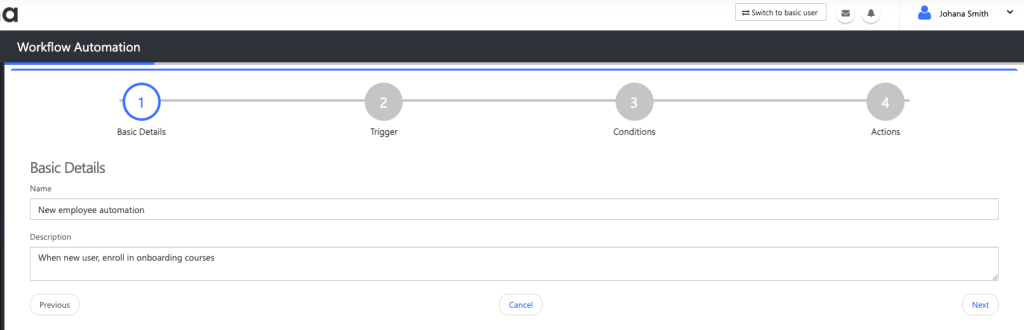
Step 5: Auto-enrol new hires
The most powerful feature for HR teams: connect your LMS to your HRIS so new hires are automatically provisioned and enrolled in the correct onboarding path on their start date.
If a direct integration isn’t available, create a simple CSV upload process that HR runs weekly. Manual provisioning is fine for low-volume hiring; automation is essential at scale.
Get our LMS implementation guide.
Real Examples: MERKUR and Port of Koper
MERKUR: Scaling onboarding across 1,200 employees
MERKUR, one of Slovenia’s largest retail and trade groups, operates across multiple locations with a workforce of 1,200 employees in diverse roles — warehouse, retail, corporate, and management.
The challenge: Onboarding was inconsistent. New hires in different locations received different information, delivered by different people, with no central record of what had been covered. Compliance training completion was tracked on spreadsheets.
The LMS approach: Smart Arena was configured with role-specific onboarding paths — separate tracks for retail staff, warehouse teams, and office-based employees. Each path included a mandatory compliance block and a role-specific skills block. Manager dashboards gave team leads real-time visibility into their team’s onboarding progress without needing to contact HR.
The outcome: All 1,200 employees active on the platform, compliance training completion tracked automatically, and onboarding delivery standardised across all locations. HR moved from manually chasing completion records to reviewing a live dashboard.
Watch video here.
Port of Koper: Onboarding 400 new hires with consistency
Port of Koper is one of the largest cargo ports in the Adriatic, with a large and operationally complex workforce. New hire onboarding had to cover safety-critical procedures, role-specific processes, and compliance requirements — consistently, at scale.
The challenge: With approximately 400 new hires per year across diverse operational roles, manual onboarding delivery was unsustainable. Safety training in particular needed to be verifiable — not just delivered, but recorded and auditable.
The LMS approach: A structured onboarding path with a mandatory safety and compliance block as Phase 1 — no new hire could progress to role-specific content until safety modules were completed and a passing quiz score was recorded. Certificates were automatically issued and stored in the learner’s profile.
The outcome: Every new hire goes through an identical safety onboarding experience regardless of who their manager is. Completion records are audit-ready. HR and safety teams have a single source of truth for onboarding compliance.
Common Onboarding Mistakes — and How an LMS Fixes Them
1. Information overload in week one
Dumping everything into the first five days overwhelms new hires and nothing sticks. An LMS enforces a structured timeline — Phase 1 content is available in week one, Phase 2 unlocks in week five.
2. No visibility for managers
When a manager doesn’t know where their new hire is in the onboarding process, they can’t support them effectively. LMS manager dashboards solve this without requiring HR to send weekly status updates.
3. Onboarding ends at week one
Most onboarding programmes are front-loaded. The 30/60/90 structure keeps the programme active through the period when most new hires disengage or start questioning their decision to join.
4. Compliance training is not verified
“Yes, I gave them the policy document” is not an audit-ready record. An LMS generates a timestamped completion certificate for every module — including a pass score for any quiz.
5. No feedback loop
Without a structured end-of-onboarding survey, programmes don’t improve. Build a feedback module into Day 90 and review responses quarterly.
6. One-size-fits-all paths for diverse roles
A retail associate and a finance analyst need different onboarding content. Build role-specific paths with a shared compliance core — same foundation, different superstructure.
Measuring Onboarding Success
Track these metrics to know whether your onboarding programme is working:
| Metric | What it measures | Where to find it |
|---|---|---|
| 30-day completion rate | % of new hires completing Phase 1 by Day 30 | LMS completion report |
| 90-day completion rate | % completing full onboarding path | LMS completion report |
| Quiz pass rate | Knowledge retention per module | LMS quiz analytics |
| Time-to-first-contribution | Days until new hire is independently productive | Manager assessment |
| 90-day retention rate | % of new hires still employed at 90 days | HR system |
| Onboarding satisfaction score | New hire perception of the onboarding experience | End-of-path survey |
Review these quarterly. If 30-day completion rates drop, the programme has too much content or the wrong content. If satisfaction scores fall, the experience is not meeting new hire expectations.
FAQ
What is an employee onboarding LMS?
An employee onboarding LMS is a learning management system configured specifically to deliver, track, and manage new hire onboarding programmes. It stores onboarding content in structured learning paths, automatically enrols new hires on their start date, tracks completion, and gives managers real-time visibility into onboarding progress.
How long should an LMS onboarding programme be?
Effective onboarding runs for at least 90 days. The first 30 days cover compliance, culture, and tools. Days 31–60 focus on role-specific skills. Days 61–90 move into performance and development. Research consistently shows that onboarding programmes shorter than 90 days produce lower retention and slower productivity.
Can I use an LMS for remote employee onboarding?
Yes — an LMS is particularly valuable for remote onboarding because it removes the dependency on physical presence or live delivery. Remote new hires access the same structured path, complete the same content, and are tracked exactly the same way as office-based hires. Manager dashboards work regardless of location.
What content do I need to build an onboarding programme in an LMS?
At minimum: a company overview module, a compliance training block (GDPR, health and safety, code of conduct), a tools and systems walkthrough, and a role introduction. Video, PDF, and SCORM formats all work. Start with what you have — a recorded presentation is better than nothing — and build more interactive content over time.
How do I measure whether my onboarding programme is working?
Track 30-day and 90-day completion rates in the LMS, quiz pass rates per module, and new hire satisfaction scores from an end-of-path survey. Pair LMS data with manager assessments at the 90-day mark to understand whether training is translating to on-the-job performance.
Conclusion
A structured employee onboarding programme built inside an LMS does three things manual onboarding cannot: it delivers consistently regardless of who manages the new hire, it gives managers real-time visibility without adding admin overhead, and it creates an auditable record of every step.
The 30/60/90 day path framework — orient, engage, perform — gives you a structure that works for most organisations and scales from 10 new hires a year to 1,000.
If you want to see how Smart Arena handles onboarding configuration — including automated enrolment, role-specific learning paths, manager dashboards, and compliance tracking — book a demo with our team and we’ll walk you through a setup built for your hiring volume and structure.